Your MRR should reflect reality, but sometimes it doesn’t.
Maybe a customer was invoiced manually outside of Stripe before the subscription was created. Maybe you extended someone’s trial even though you already consider them a paying customer and want them counted toward MRR. Maybe a subscription temporarily needs to be represented differently for reporting purposes.
Until now, handling these situations usually meant changing data directly in your payment provider or manually recreating the customer in Baremetrics.
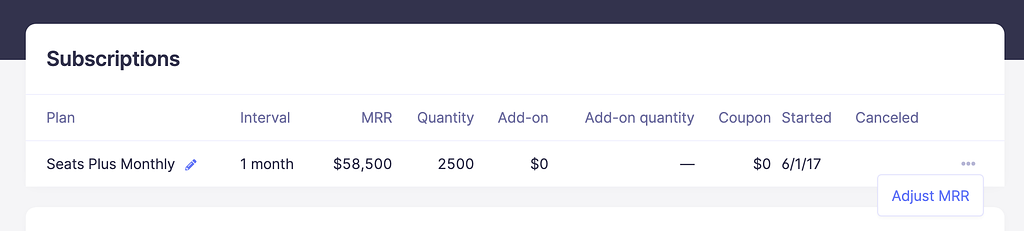
We recently added a new feature called Edit MRR to help handle these edge cases without requiring changes in your payment provider. MRR Adjustments lets you override how a subscription is represented inside Baremetrics for a specific period of time.
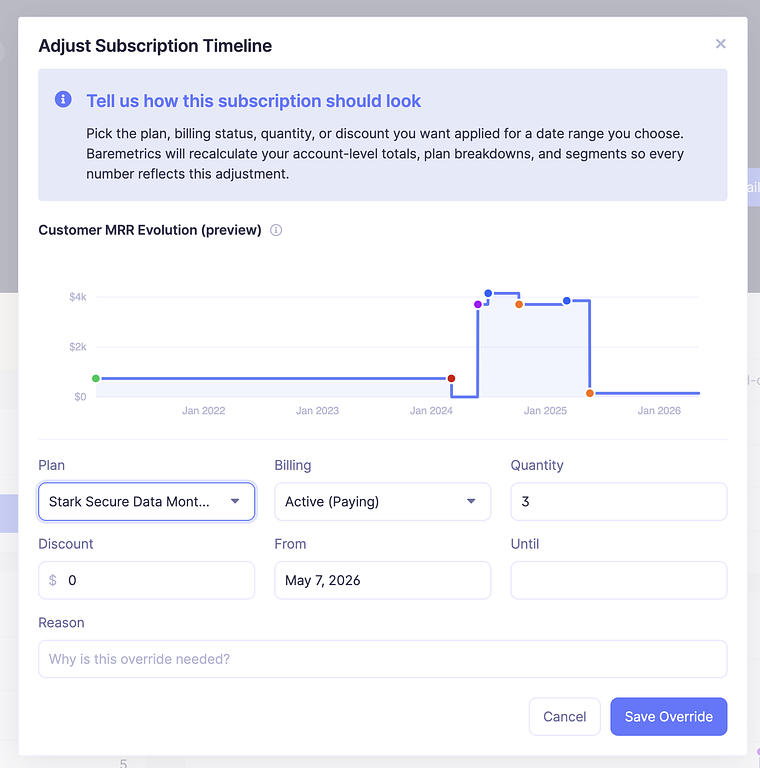
From the customer profile, open the subscription, click “Adjust MRR,” and update things like:
Plan
Billing status
Quantity
Discounts
You can apply adjustments to a specific date range, stack multiple adjustments on the same subscription, and remove them at any time. Metrics recalculate immediately when changes are made. Your provider sync will continue working normally and adjustments only exist inside Baremetrics and are never pushed back to your payment provider. This feature is designed for situations where your billing system and your reporting don’t perfectly line up, and you need your metrics to reflect what actually happened.
If you don’t see “Adjust MRR” in your account yet, reach out to support. Your account may still need to be upgraded to the latest version of Baremetrics.
Full details are available in the help doc: [link]