đ Rolling out now: Weâre gradually rolling this out across all accounts over the next few weeks. If youâd like access sooner, just reach out to our support team and weâll enable it for you.
Weâve reworked the Breakout table to give you a clearer picture of whatâs really driving your metrics. Before, youâd see high-level changes like New, Expansion, and Churn⌠but if you wanted to understand why those changed (monthly vs annual, specific segments, etc.), you had to click around or export data.
Now, you can see it all in one place.
Breakouts are organized in a clean, P&L-style view with segments nested directly underneath each category. So instead of just seeing âExpansion,â you can immediately see how much came from annual vs monthly (or any segment youâre using).
Everything stays aligned, scannable, and adds up exactly how youâd expect:
Parent rows still show totals
Child rows break down where that change actually came from
You can collapse anything if you just want the high-level view
This works across MRR, upgrades, downgrades, churn, refunds, customers, and more.
Segmented Breakout on MRR
Itâs a small UI shift, but a big step toward answering the question we hear all the time:
âCool⌠but where is this actually coming from?â
Now you donât have to guess or export to find out.
If your customers require a base plan before they can purchase additional plans or add-ons, this keeps your metrics aligned with how your product actually works.
Until now, Baremetrics applied a deterministic rule to select one subscription to represent lifecycle events (like churn) when multiple subscriptions were added or removed at the same time.
That created problems for products where:
A base plan is required
Add-ons canât exist on their own
Because of that, Baremetrics could:
Count add-ons as new customers
Attribute churn to add-ons instead of the main product
Whatâs new
You can now mark a plan as a Base Plan. When a Base Plan is present, Baremetrics will treat it as the foundation of the customer relationship:
Starting a Base Plan â New Customer
Adding add-ons â Expansion
Removing add-ons â Contraction
Cancelling the Base Plan â Churn
If multiple plans are changed at the same time:
The Base Plan determines the lifecycle event
Add-ons are treated as supporting revenue changes
Why this matters
Your metrics now reflect how your product actually works.
Before
Add-ons could trigger ânew customerâ events
Churn could be attributed to something like âExtra Seatsâ
Core product churn was underreported
After
Only Base Plans define when a customer starts or leaves
Add-ons no longer distort lifecycle metrics
Plan-level reporting becomes accurate and intuitive
Where to find it
Head to your Plan Management and mark your required plan as the Base Plan.
Learn more in our help docs and, as always, feel free to reach out if anything comes up.
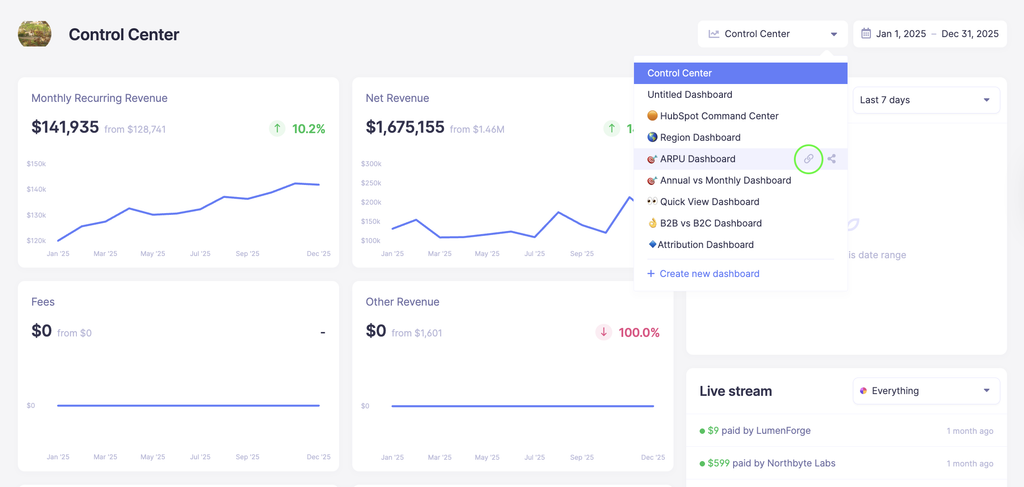
Custom Dashboards are where you build views of the business. But⌠theyâve been a little messy. So we fixed the three things that were getting in the way.
Less noise, more signal: We removed the sidebar (Breakdown + Live Stream) from Custom Dashboards. Those panels make sense on the main dashboard, but not when youâre trying to build something intentional. They werenât customizable, took up space, and honestly just got in the way. Now youâve got a true 3-column layout to work with, so you can actually design a dashboard that fits how you think about your business.
Segments now follow you: Clicking into a metric from a dashboard now keeps your segment applied. Before, youâd click a tile and land on the main metric⌠unsegmented. Which meant you had to reapply filters and retrace your steps. Now, whatever segment youâre viewing carries through automatically.
Dashboards that load when you open them: We fixed timeout issues that were causing some Custom Dashboards to fail or just spin forever. Now they load reliably, even when youâre stacking multiple widgets. And if something does go wrong, it wonât fail silently.
Overall, this makes Custom Dashboards feel a lot more like what they were meant to be - a place to build focused, reliable views of your business. đ
This two-way integration brings key subscription metrics from Baremetrics into HubSpot, while allowing CRM context from HubSpot to flow back into Baremetrics. The goal is simple: give your sales, success, and revenue teams the same source of truth across both platforms.
Subscription metrics from Baremetrics can now appear directly on HubSpot records, giving your team better context when working deals, customers, and accounts. This helps teams understand things like revenue growth, churn risk, and customer value without leaving the CRM.
Send CRM context back to Baremetrics
HubSpot properties can be synced into Baremetrics, allowing you to segment and analyze your revenue using CRM data such as owner, lifecycle stage, or company attributes.
Keep both systems aligned
Updates in either platform can sync across systems so your CRM and subscription analytics stay consistent.
Weâve added a new export to Data Exports called the Breakdown Details Report.
This report provides a detailed, per-customer view of the events that affected your metrics on a specific date. Each row represents a subscription event such as a new trial, expansion, or cancellation, along with the associated MRR change and coupon information.
Located in Exports
Where to find it
You can access the report from Settings â Data Exports. Select a date and download the CSV to see all metric movements for that day.
The export includes:
Event type (trial, expansion, cancellation, etc.)
Customer ID and name
Previous and current plan
Customer MRR and MRR change
ARR impact
Coupon changes (previous and current)
This report is useful when you want to audit a specific day in Baremetrics and see exactly which customers and subscription events contributed to changes in your metrics.