Baremetrics logo

Baremetrics Updates

The latest updates and product improvements.

New: Introducing Revenue Pulse (Beta)

Metrics New

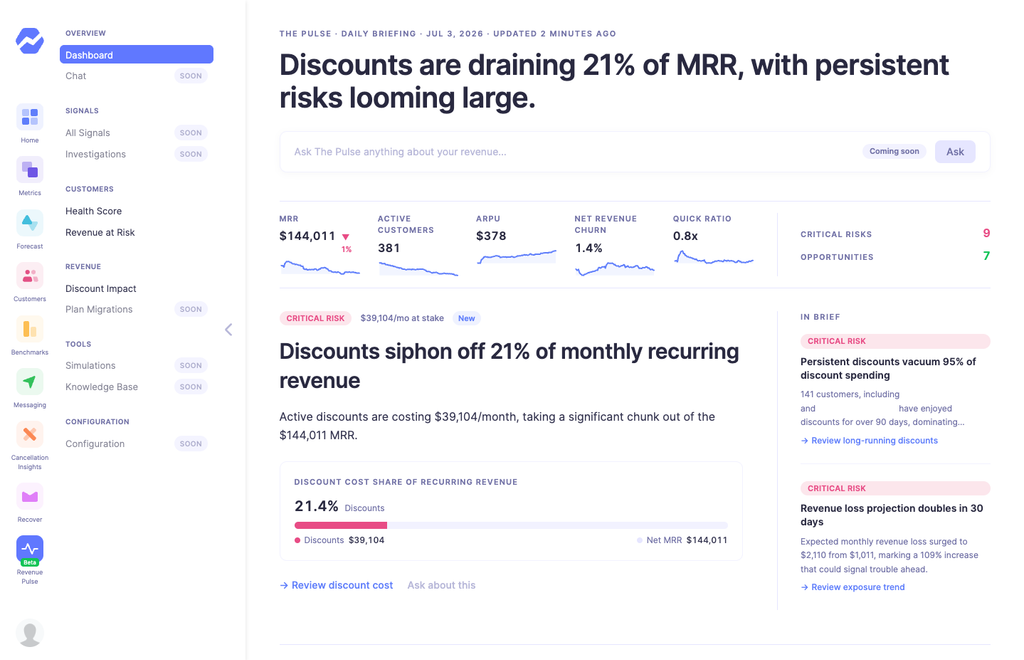
Revenue Pulse is a new intelligence layer for Baremetrics. Where your main dashboard shows you the metrics, Revenue Pulse watches them for you and surfaces what actually deserves your attention today β€” revenue about to walk out the door, discounts that stopped paying for themselves, customers drifting toward churn, and the occasional piece of good news too.

It's made up of four new dashboards:

  • Daily Briefing β€” your editorial front page. What should you look at today?
  • Customer Health Score β€” every customer scored 0–100 from clear, explainable factors.
  • Revenue at Risk β€” forward-looking exposure: how much MRR could be lost soon, and through which channels.
  • Discount Impact β€” what your coupons are actually costing you, which cohorts are absorbing them, and whether they're buying loyalty or just delaying churn.
This is an early beta, and here's what you need to know:

  • You must be on our newest Stripe integration to be eligible.
  • Access is invite-only for now β€” you'll need to request to join.
  • We're actively looking for feedback during this period and would love to hear your team's thoughts as you use it.

To request access, email success@baremetrics.com β€” approved accounts get 2 months of Revenue Pulse access to try it out.

23 days ago

New: Baremetrics MCP πŸ€– - Your Baremetrics Data Just Got a Whole Lot Smarter

Metrics New Feature
Ask your metrics questions. Get instant answers.

Baremetrics now supports the Model Context Protocol (MCP) β€” which means you can connect your live revenue data directly to Claude, Cursor, or Codex and just... ask it things.

Your AI tool pulls the answer straight from Baremetrics. No exports, no copy-pasting, no context switching.

Getting started is super easy. All you need is your Baremetrics API key and a supported AI tool.
4 months ago

New: Customer Insights β€” Renewing, Cancelling, Non-Paying, and Geo Data

Metrics New Feature
This one has been a long time coming. πŸ‘€

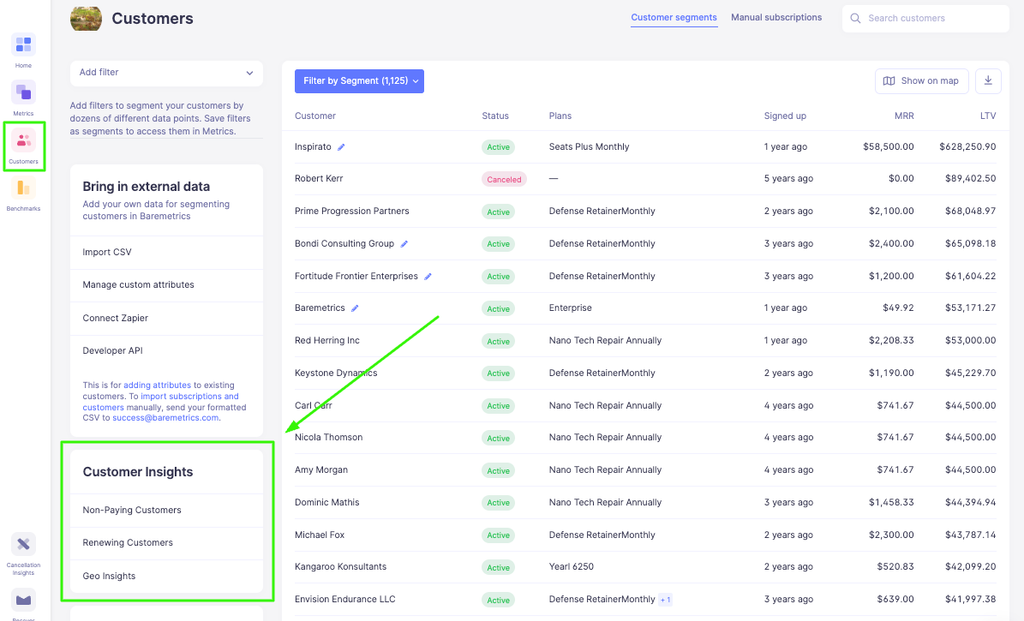
Know exactly who needs your attention, right now. Under Customers β†’ Customer Insights you'll find four lists built to answer the question you're always asking: who's in this situation today?
🚫 Non-Paying β€” Customers with an active subscription who aren't generating revenue. Filter by free plan, 100%-off coupon, or see them all in one view. Great for identifying trial conversion opportunities or cleaning up comp accounts.

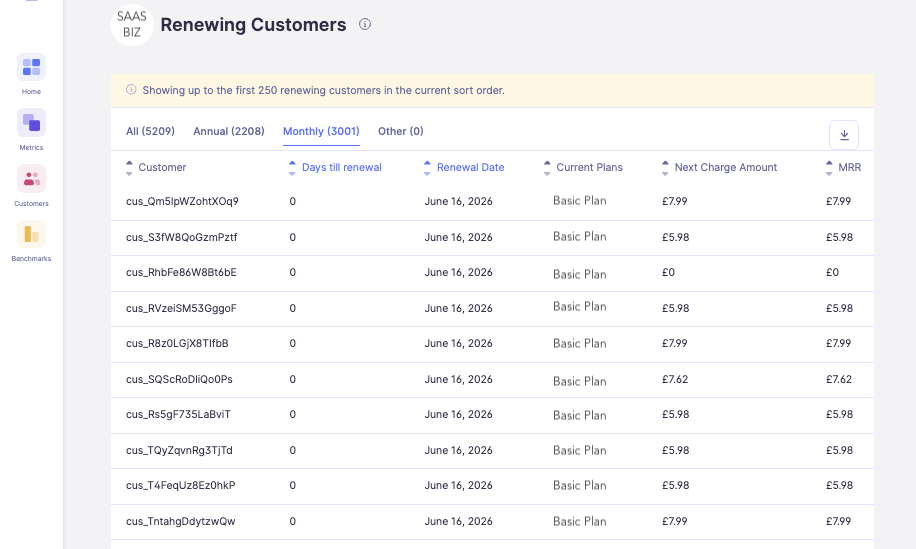
πŸ”„ Renewing β€” Customers billing again soon. Monthly customers within 7 days, annual within 45. See days until renewal and next charge amount β€” perfect for proactive outreach before a big renewal hits.
❌ Cancelling β€” Customers who've already requested cancellation and are scheduled to end within 45 days. Get ahead of it before they're gone. (Requires cancel-at-period-end to be enabled in your Stripe settings.)

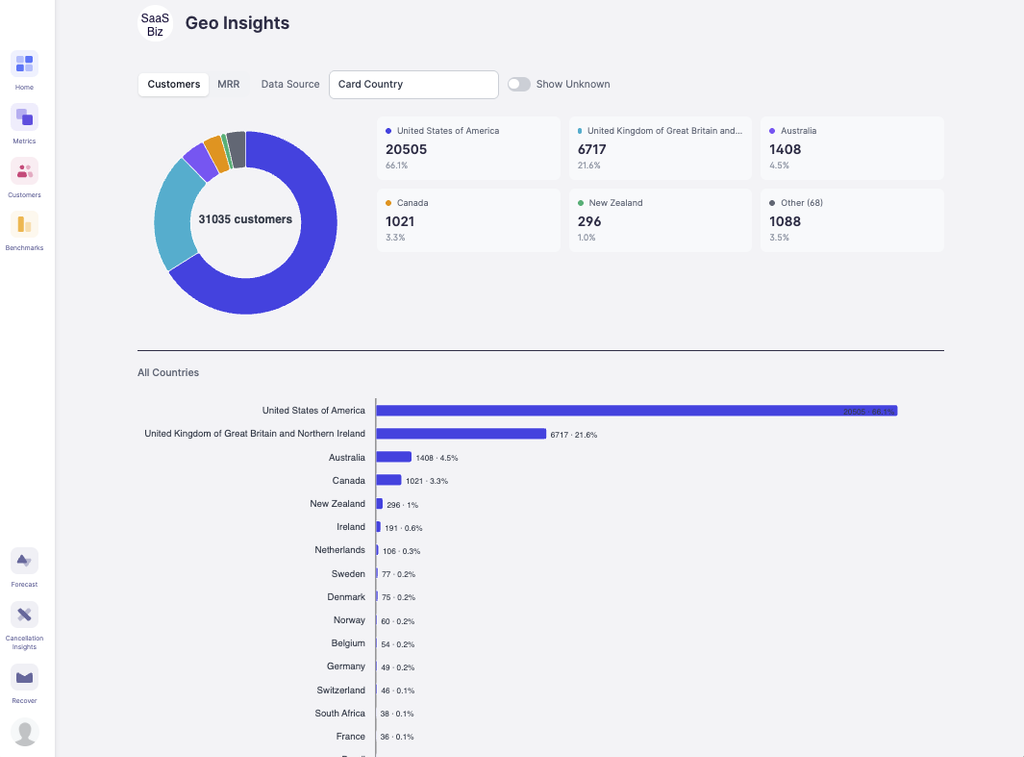
🌍 Geo β€” A breakdown of your customers by location, viewable by customer count or MRR. Finally know where in the world your revenue is coming from.

A few things worth knowing:
  • Lists refresh once daily, not in real time
  • Each list shows up to 250 customers β€” tab counts always reflect true totals
  • Need the full list? CSV export is available and arrives by email
  • Integration support varies by list β€” check the help doc for details
πŸ“– Help doc: https://help.baremetrics.com
4 months ago

Custom Dashboard Sharing

Metrics New Feature
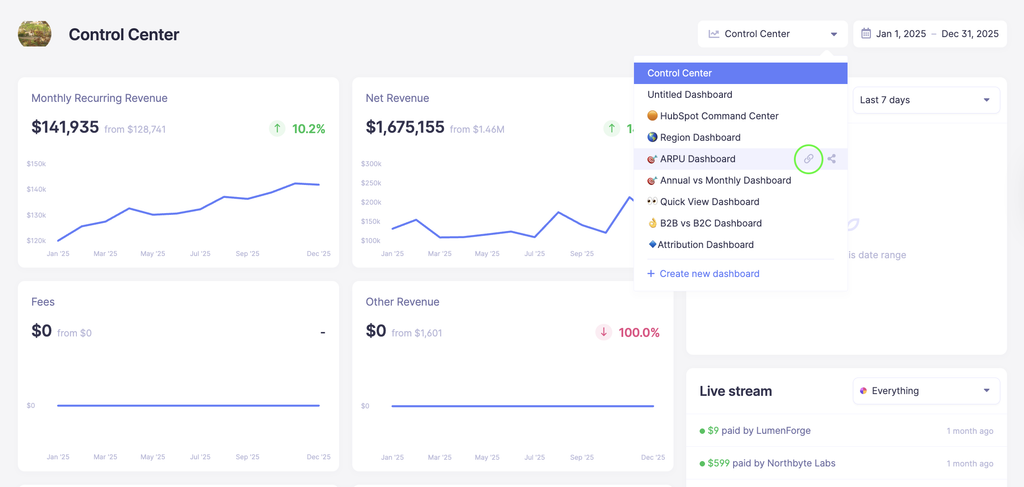
You've been able to share your metrics publicly for a while now β€” but sharing everything isn't always what you need.

With Custom Dashboards, you can now handpick exactly which metrics and segments you want to share, build them into a dedicated dashboard, and share just that link with whoever needs it β€” investors, team members, or anyone else, no Baremetrics account required.

External viewers get a clean, focused view with no navigation or dashboard switcher β€” just the numbers you chose to share. Note that any customer tiles included on the dashboard will be automatically removed from the shared view, so only metrics and numbers data will be visible.
4 months ago

New: Edit Your Customer's MRR

Metrics New Feature Improvement
Your MRR should reflect reality, but sometimes it doesn’t.

Maybe a customer was invoiced manually outside of Stripe before the subscription was created. Maybe you extended someone’s trial even though you already consider them a paying customer and want them counted toward MRR. Maybe a subscription temporarily needs to be represented differently for reporting purposes.

Until now, handling these situations usually meant changing data directly in your payment provider or manually recreating the customer in Baremetrics.

We recently added a new feature called Edit MRR to help handle these edge cases without requiring changes in your payment provider. MRR Adjustments lets you override how a subscription is represented inside Baremetrics for a specific period of time.


From the customer profile, open the subscription, click β€œAdjust MRR,” and update things like:
  • Plan
  • Billing status
  • Quantity
  • Discounts
You can apply adjustments to a specific date range, stack multiple adjustments on the same subscription, and remove them at any time. Metrics recalculate immediately when changes are made. Your provider sync will continue working normally and adjustments only exist inside Baremetrics and are never pushed back to your payment provider.
This feature is designed for situations where your billing system and your reporting don’t perfectly line up, and you need your metrics to reflect what actually happened.

If you don’t see β€œAdjust MRR” in your account yet, reach out to support. Your account may still need to be upgraded to the latest version of Baremetrics.

Full details are available in the help doc: [link]
5 months ago
Loading more updates...