New: Introducing Revenue Pulse (Beta)
Metrics
New
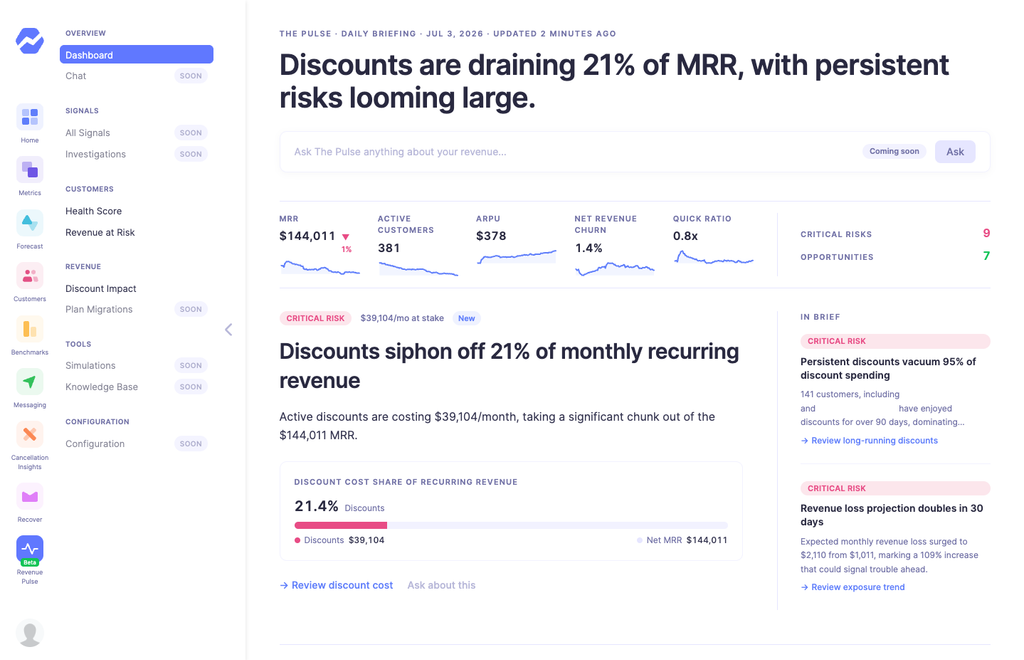
Revenue Pulse is a new intelligence layer for Baremetrics. Where your main dashboard shows you the metrics, Revenue Pulse watches them for you and surfaces what actually deserves your attention today — revenue about to walk out the door, discounts that stopped paying for themselves, customers drifting toward churn, and the occasional piece of good news too.
It's made up of four new dashboards:
- Daily Briefing — your editorial front page. What should you look at today?
- Customer Health Score — every customer scored 0–100 from clear, explainable factors.
- Revenue at Risk — forward-looking exposure: how much MRR could be lost soon, and through which channels.
- Discount Impact — what your coupons are actually costing you, which cohorts are absorbing them, and whether they're buying loyalty or just delaying churn.
This is an early beta, and here's what you need to know:
- You must be on our newest Stripe integration to be eligible.
- Access is invite-only for now — you'll need to request to join.
- We're actively looking for feedback during this period and would love to hear your team's thoughts as you use it.
To request access, email success@baremetrics.com — approved accounts get 2 months of Revenue Pulse access to try it out.
23 days ago